

TSS and IMMI: What Is Internal Market Movement Information?
- John Hall
- Customs Specialist at iCustoms.ai
Internal Market Movement Information, or IMMI, is a simplified data set that eligible UK Internal Market Scheme (UKIMS) authorised businesses can submit through the (iTSS) Trader Support Service instead of a full customs declaration for goods moving from Great Britain to Northern Ireland. It asks for less information than a full declaration, it can draw on your Trader Goods Profile rather than requiring a fresh commodity code every time, and it can be submitted before the goods move or afterwards through UKIMS-EIDR. Not every movement qualifies. The goods have to be Standard or Category 2, not at risk of entering the EU, already in free circulation, moving by direct transport, and intended for sale to or use by end consumers in the UK.
This guide sets out what IMMI actually requires, who can use it, and how a submission runs from the data you hold to the Goods Movement Reference the vehicle needs at the port.
What Internal Market Movement Information actually is
IMMI sits under the Simplified Processes for Internal Market Movements introduced as part of the Windsor Framework arrangements that took effect on 1 May 2025. Where a full customs declaration asks for the complete data set a customs authority needs to assess duty and compliance, IMMI asks for a reduced version of the same picture, built on the basis that the goods are staying in the UK and are not headed on into the EU.
It is worth being precise about what it replaces. IMMI is an alternative to a full customs declaration, not to the TSS Simplified Procedure, which pairs a simplified frontier declaration with a supplementary declaration due by the tenth of the following month. IMMI needs neither: it is a single submission, and usually the lightest route available. Where it does not apply, the movement falls back to the Simplified Procedure or a full frontier declaration, both covered in our guide to TSS declaration types.
IMMI at a glance
| Question / Answer | |
|---|---|
| What it replaces | A full customs declaration, for eligible movements |
| Data required | A reduced set; the Trader Goods Profile can supply the commodity code, origin and description |
| Who can use it | Businesses where the sender or the receiver holds UKIMS authorisation |
| When it is submitted | Before the movement, or afterwards through UKIMS-EIDR |
| Goods eligible | Standard and Category 2 goods that are not at risk |
| Goods excluded | Category 1 goods, in every case |
| Supplementary declaration needed | No |
Who can use IMMI: the eligibility conditions
All of the following have to hold. Miss one and the movement needs a different route.
- The goods are not at risk of entering the EU.
- The goods are in free circulation in Great Britain and moving into free circulation in Northern Ireland.
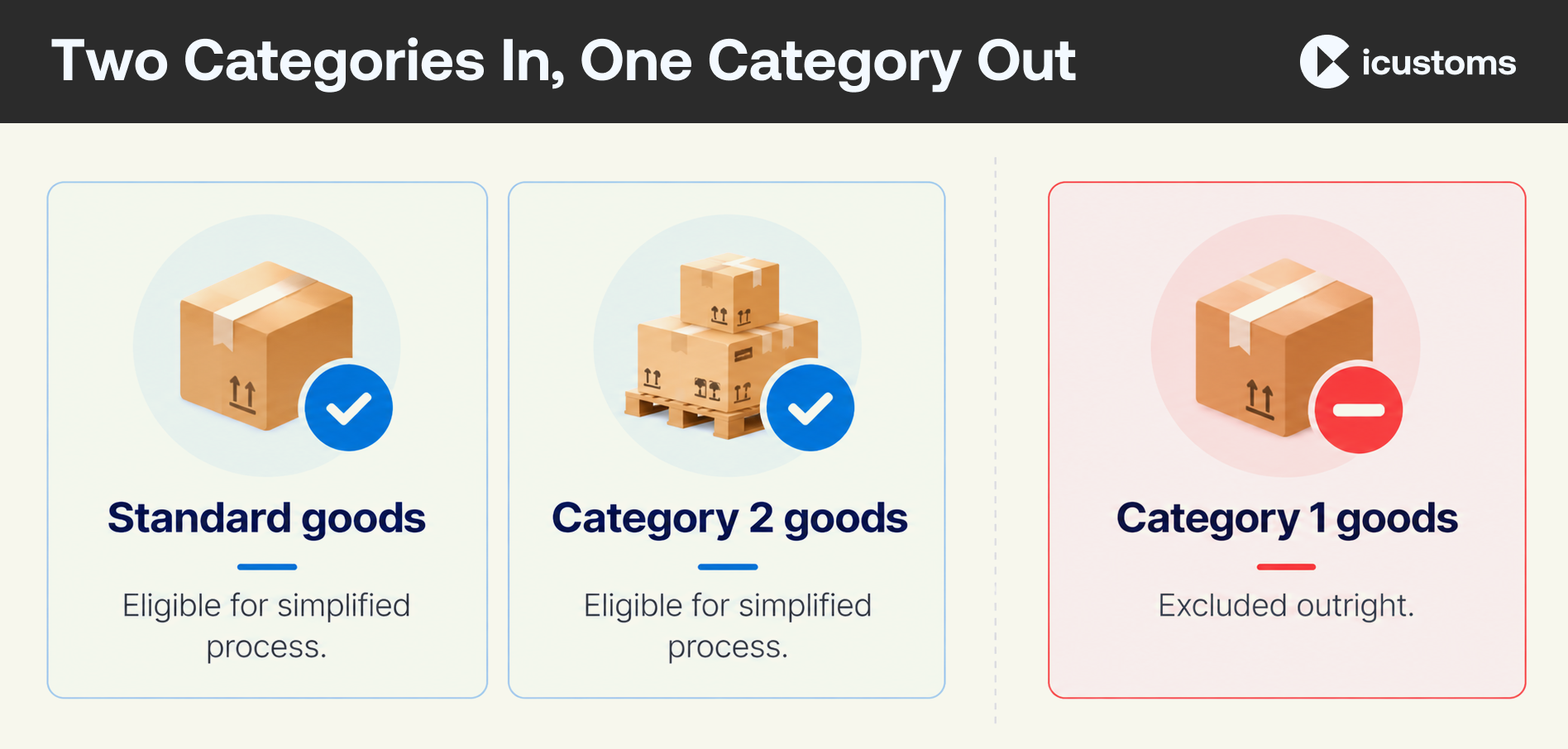
- The goods are Standard or Category 2. Category 1 goods cannot use IMMI under any circumstances.
- The movement is by direct transport from Great Britain to Northern Ireland.
- The goods are intended for sale to, or use by, end consumers in the UK.
- The sending business or the receiving business holds UK Internal Market Scheme authorisation.
That last point catches people out. UKIMS authorisation does not have to sit with the party actually submitting the IMMI. Either the sender or the receiver can hold it, provided the party doing the submitting has permission to use it. What UKIMS is, and how a business applies for authorisation, is covered separately in UKIMS and TSS.
Where the not-at-risk decision itself is made, and what evidence supports it, is its own subject, set out in our guide to at-risk and not-at-risk goods.

Standard, Category 2, and the one category that is always excluded
Whether goods qualify for IMMI turns on which of three categories they fall into. Full detail, including commodity code length and worked examples, sits in our overview of the Trader Support Service. The version that matters for IMMI eligibility is short.
Standard goods are the lightest category: non-excise, no documentary controls, and eligible for IMMI where the other conditions hold. Category 2 goods cover excise products and goods subject to documentary controls such as certificates or licences; they remain eligible, but the submission has to carry the extra document references those controls require. Category 1 goods are excluded from IMMI outright, whatever else is true. This covers goods subject to trade defence measures, total bans or prohibitions, tariff rate quotas and comparable restrictions, and those movements need a full customs declaration.
How the Trader Goods Profile speeds this up
A Trader Goods Profile is created automatically when a business registers for UKIMS. It holds a record for each product the business regularly moves: the goods description, commodity code, product reference, country of origin and category.
Where a profile entry exists, the person completing the IMMI can select it rather than typing the commodity data again. The commodity code, origin and description populate automatically, and what is entered by hand is the product reference or a simple description, alongside the usual commercial detail: quantity, weight, value. For a business moving the same range of products repeatedly, this is the single biggest reduction in manual entry that IMMI offers. Building and maintaining the profile properly is covered in full in TSS and the Trader Goods Profile.
Submitting before the movement
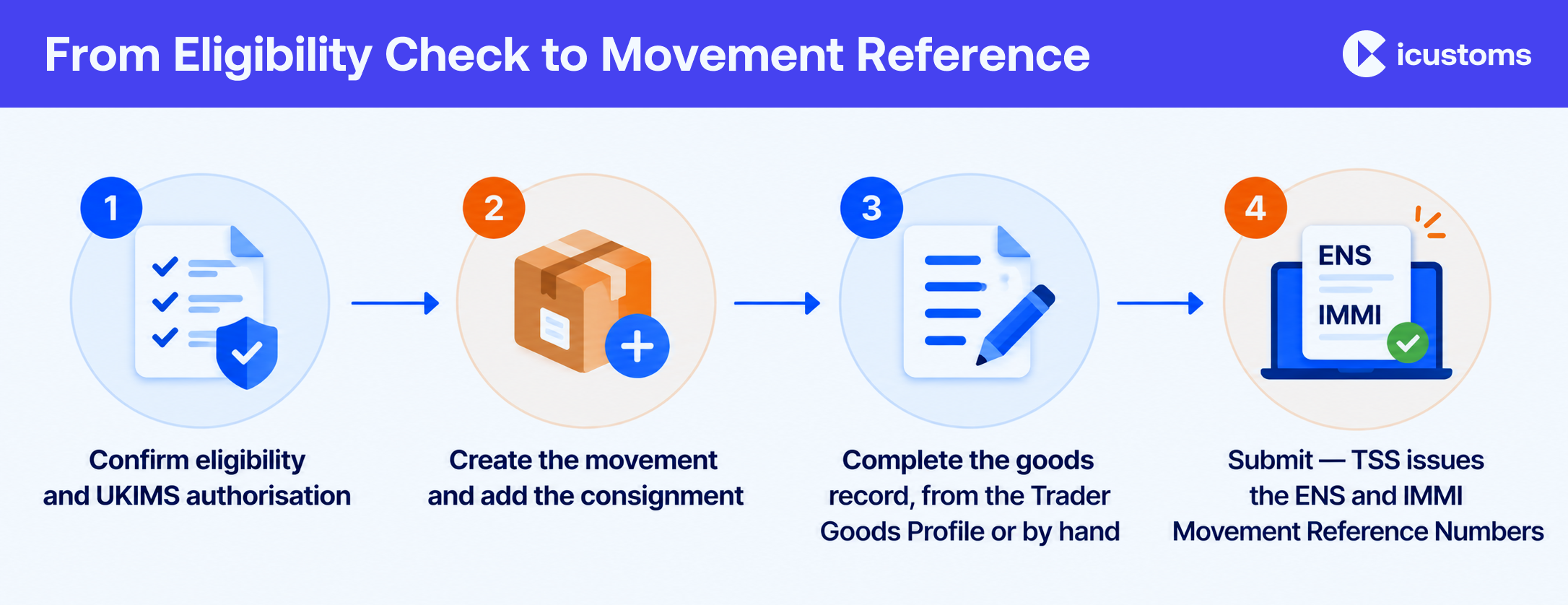
The more common route, and the one worth learning first, is submitting IMMI before the goods move. In outline:
- Confirm eligibility: not at risk, free circulation, the right goods category, and UKIMS authorisation in place on the correct side of the transaction.
- Create the movement in TSS, entering the transport details and an arrival date within 14 days. Movements further out are saved as a draft until the date is closer.
- Add the consignment and validate the importer’s EORI number against the UKIMS authorisation being used.
- Complete the goods record, either by selecting a Trader Goods Profile entry, which pre-populates the commodity data, or by entering it manually. Either way, the correct procedure and additional procedure code has to be confirmed against the goods category.
- Attach the supporting document references the goods need, including the document code that confirms not-at-risk status.
- Submit. The status moves to Authorised for Movement, and TSS issues the Entry Summary Declaration and IMMI Movement Reference Numbers.
For roll-on roll-off movements, the haulier then needs both of those reference numbers to build the Goods Movement Reference before the vehicle can board. That mechanic, and what happens if the reference does not match the vehicle, is covered in TSS and GVMS.
Vehicle and trailer details can be updated up to four hours before the goods arrive in Northern Ireland, which is useful room if a trailer changes at the last minute. It does not extend to the goods data itself, so get that right earlier.
Submitting after the movement: UKIMS-EIDR
Where pre-movement submission does not suit the business, the alternative is UKIMS-EIDR: entering the movement in your own records at the time it happens, then submitting the fuller information afterwards, by the tenth calendar day of the month following the movement.
It carries its own eligibility conditions on top of UKIMS authorisation: an XI EORI, being established in Northern Ireland, a named compliance officer, and software able to communicate with the Customs Declaration Service. Some businesses are exempt, including those who already hold EIDR authorisation under the simplified customs declaration process, and those using TSS as an intermediary. UKIMS-EIDR is a distinct authorisation from ordinary EIDR; the full comparison, process and deadlines are set out in TSS EIDR explained.
What IMMI does not do
Two misconceptions come up often enough to address directly.
IMMI does not remove the need for accurate goods data. The dataset is shorter, not less important. A wrong commodity code, or a Trader Goods Profile entry that has not been kept current, produces the same downstream problems it would on a full declaration.
IMMI does not change who is responsible for the movement. The trader remains accountable for the accuracy of what is submitted, whichever route is used. Using the lighter dataset changes the workload, not the obligation.
Frequently Asked Questions
What is Internal Market Movement Information?
It is a simplified data set that eligible UKIMS-authorised businesses can submit for goods moving from Great Britain to Northern Ireland, instead of a full customs declaration.
Do I need UKIMS to use IMMI?
Yes. Either the sending or the receiving business must hold UK Internal Market Scheme authorisation, and the party submitting the IMMI needs permission to use it.
Can I submit IMMI before the goods move?
Yes, and it is the more common route. Movements can also be handled afterwards through UKIMS-EIDR.
What happens if a movement does not meet the IMMI conditions?
It falls back to the TSS Simplified Procedure or a full frontier declaration, depending on the goods and how they travel.
Does the Trader Goods Profile remove the need for a commodity code?
No, but it removes the need to re-enter one. The profile holds the code and pre-populates it; someone still has to keep the profile accurate.
Can Category 1 goods use IMMI?
No. Category 1 goods are excluded from IMMI regardless of any other condition, and need a full customs declaration.
What is the difference between IMMI and the TSS Simplified Procedure?
IMMI is a single, lighter submission with no supplementary declaration. The Simplified Procedure is two submissions: a simplified frontier declaration at the movement, then a supplementary declaration afterwards.
Do I still need a Goods Movement Reference if I use IMMI?
Yes, for roll-on roll-off movements. The haulier builds it from the Entry Summary Declaration and IMMI Movement Reference Numbers that TSS issues.
You may also like:
Simplify your IMMI submissions with iTSS.

See how automated customs processing can reduce manual work
Subscribe to our Newsletter
About iCustoms
iCustoms is an all-in-one solution helping businesses automate customs processes more efficiently. With AI-powered and machine-learning capabilities, iCustoms is designed to streamline your all customs procedures in a few minutes, cut additional costs and save time.
Moving goods from Great Britain to Northern Ireland?
Discover how iCustoms can simplify your TSS declarations